Five languages
Spanish, French, German and Arabic are proofread as carefully as English, each in its own dictionary. Arabic set left to right, with its full stops at the start of the line, is caught too.

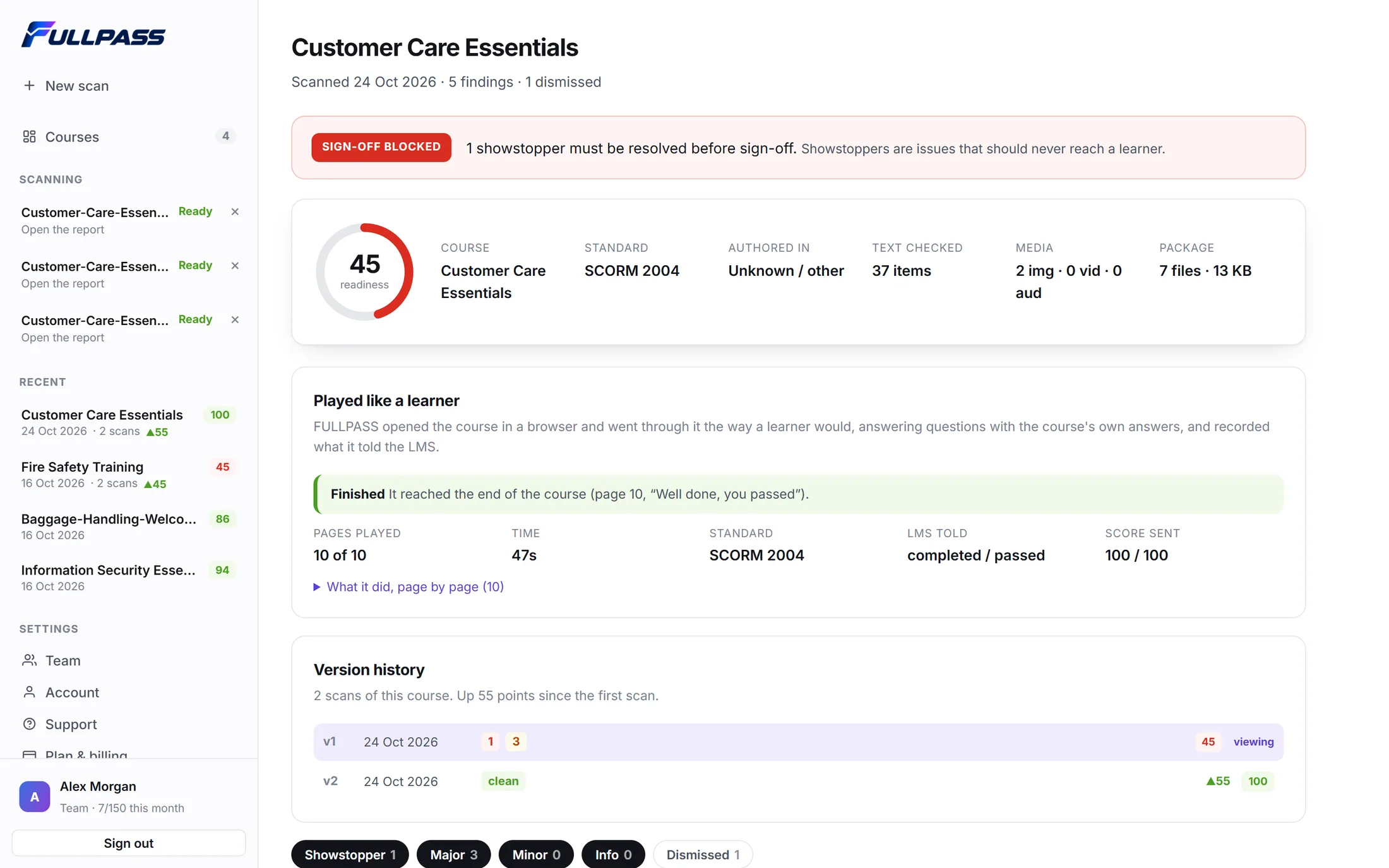
FULLPASS plays your published course in a real browser, like a learner: every screen, button and question, and what your LMS is told. It checks every word, picture, link and video frame too, and shows each problem where it happens.
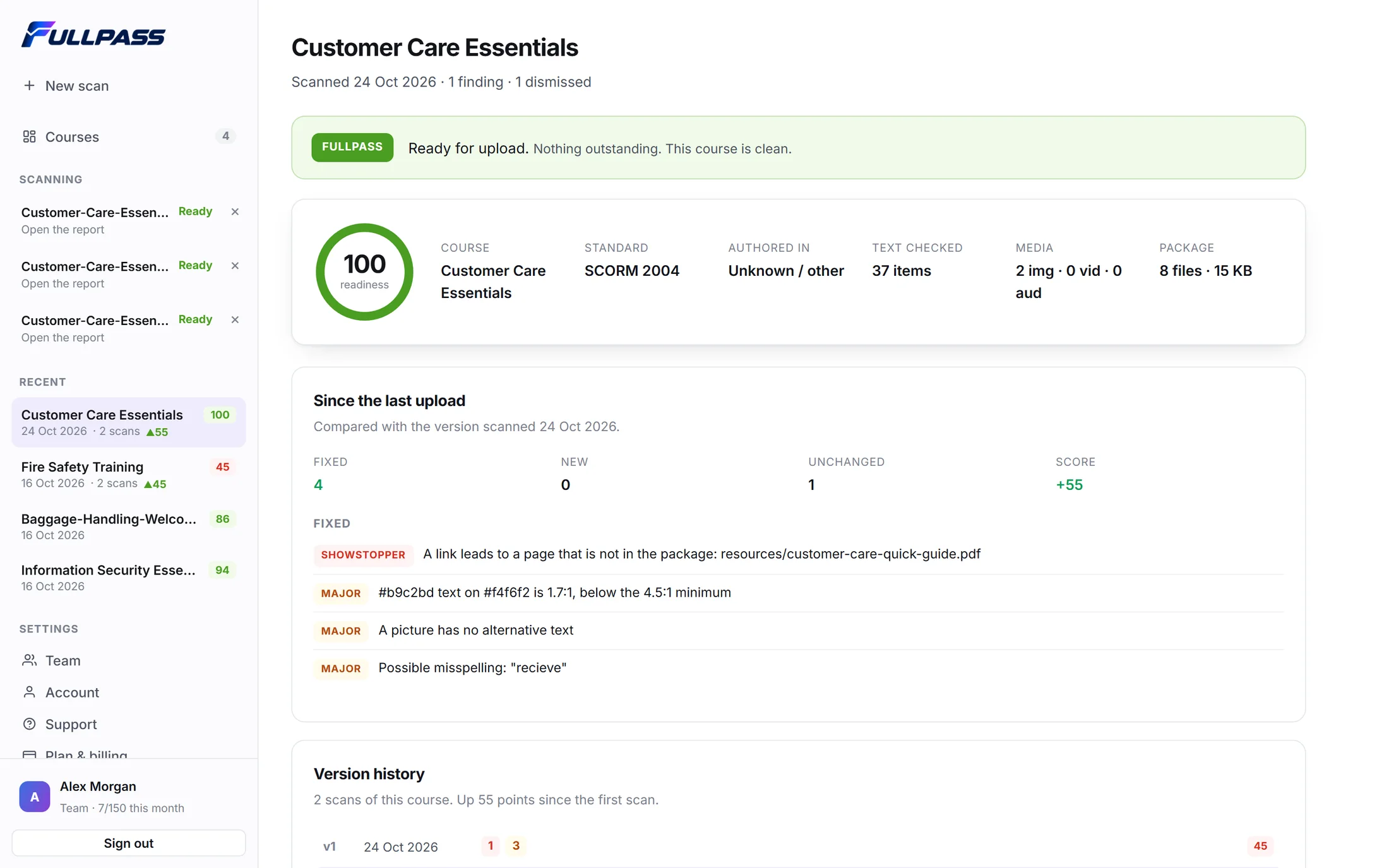
The real report, for an invented demo course.
Look past the obvious. FULLPASS reads the published course the way your authoring tool built it, then plays it the way a learner will, so it finds what breaks a course, trips up a learner or slows down sign-off.
Storyline and Rise are read slide by slide: every object, trigger, layer and timeline. Captivate, iSpring, Lectora, Camtasia, dominKnow and hand-built courses get the packaging, tracking, link, media, spelling and accessibility checks.
The words burnt into the picture are proof-read, the sound is measured, and the narration is transcribed and checked against the captions and your script, in English, Spanish, French, German or Arabic.
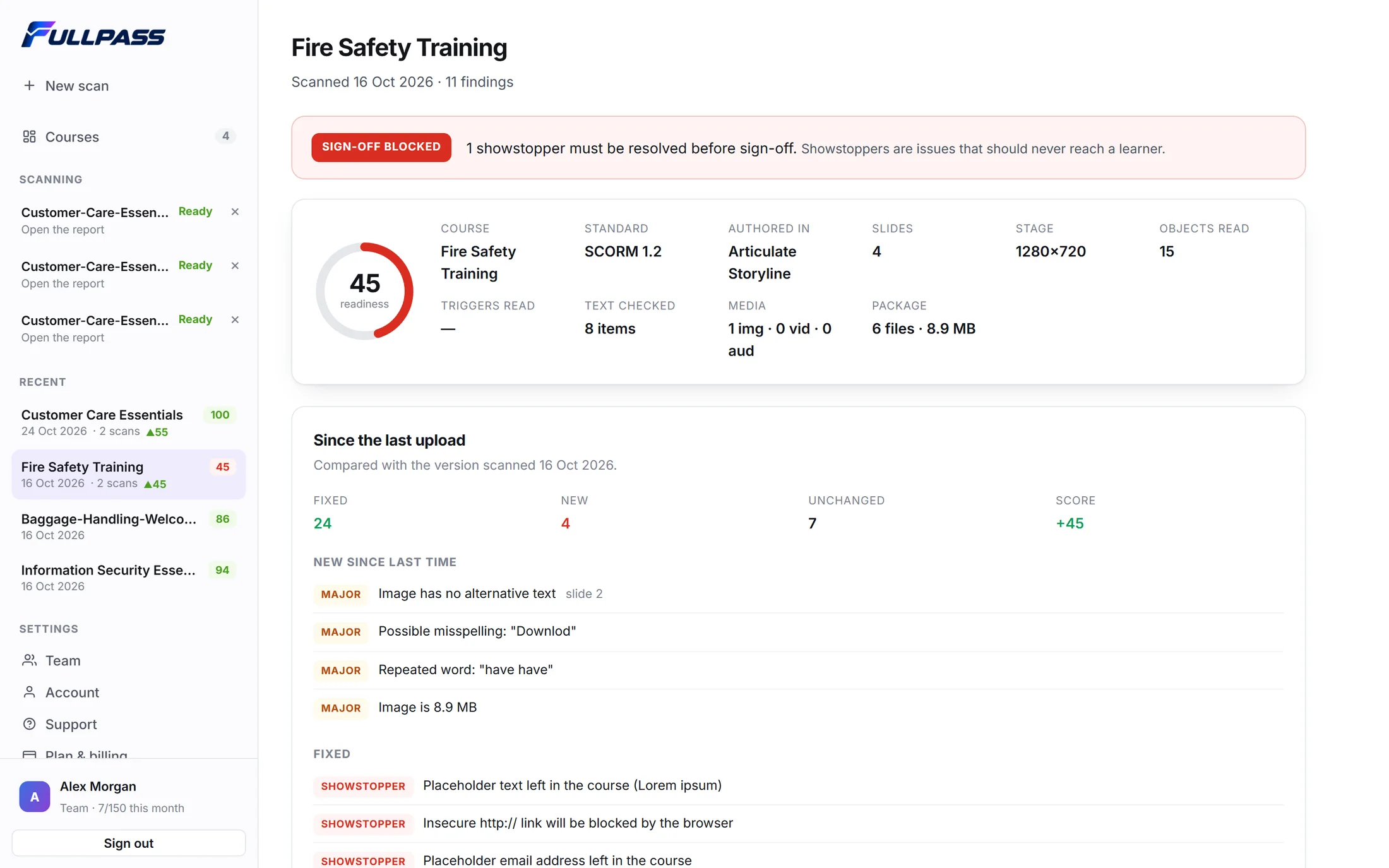
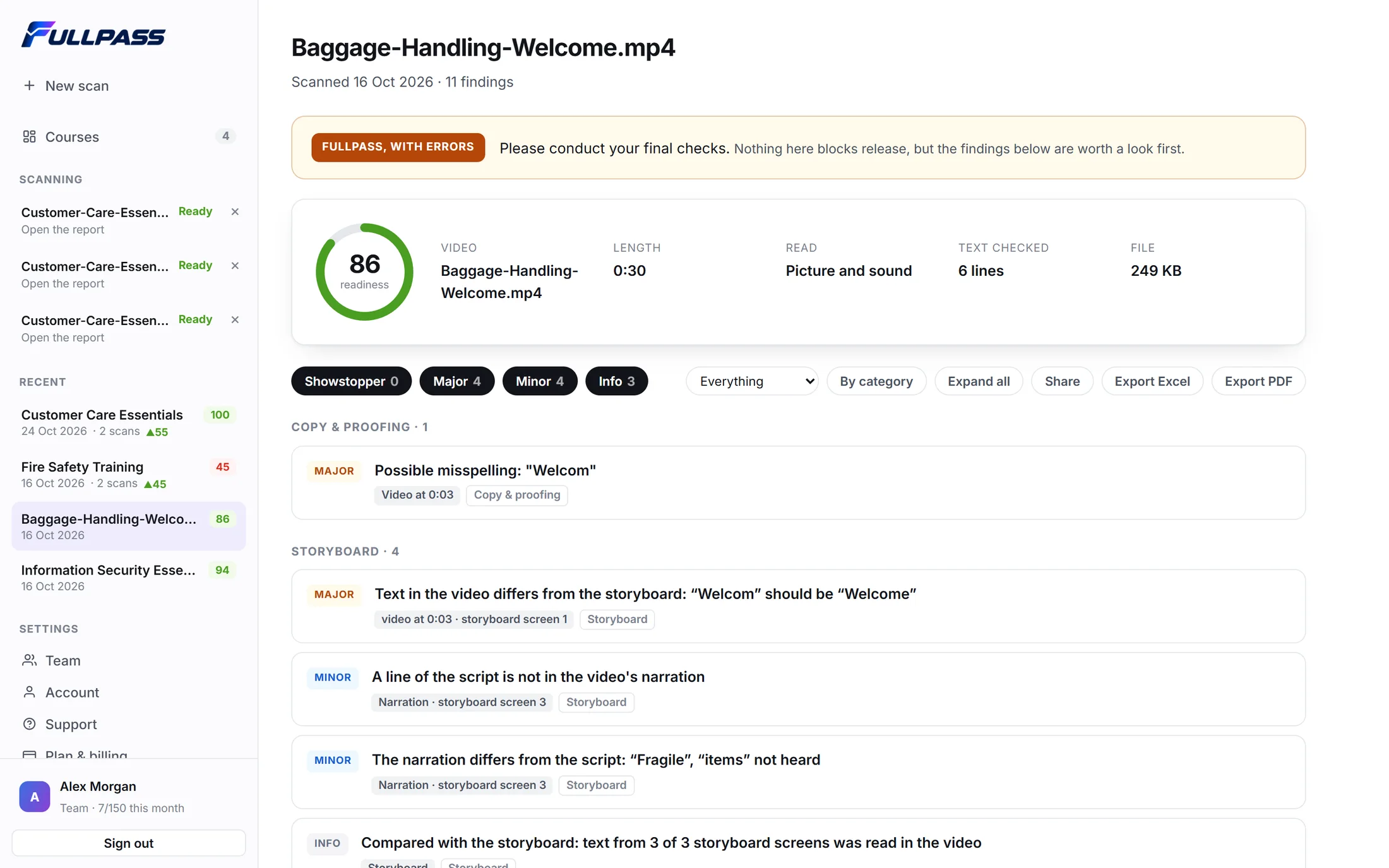
One real scan, start to finish: a course dropped in, read, played like a learner and reported. Then fixed and scanned again.
Filmed in FULLPASS with a demo account and an invented course. The scores, pictures and playthrough are the app's own; the scan is sped up where it says so.
The same steps every time, from the first upload to the final sign-off. No setup and no settings to learn.
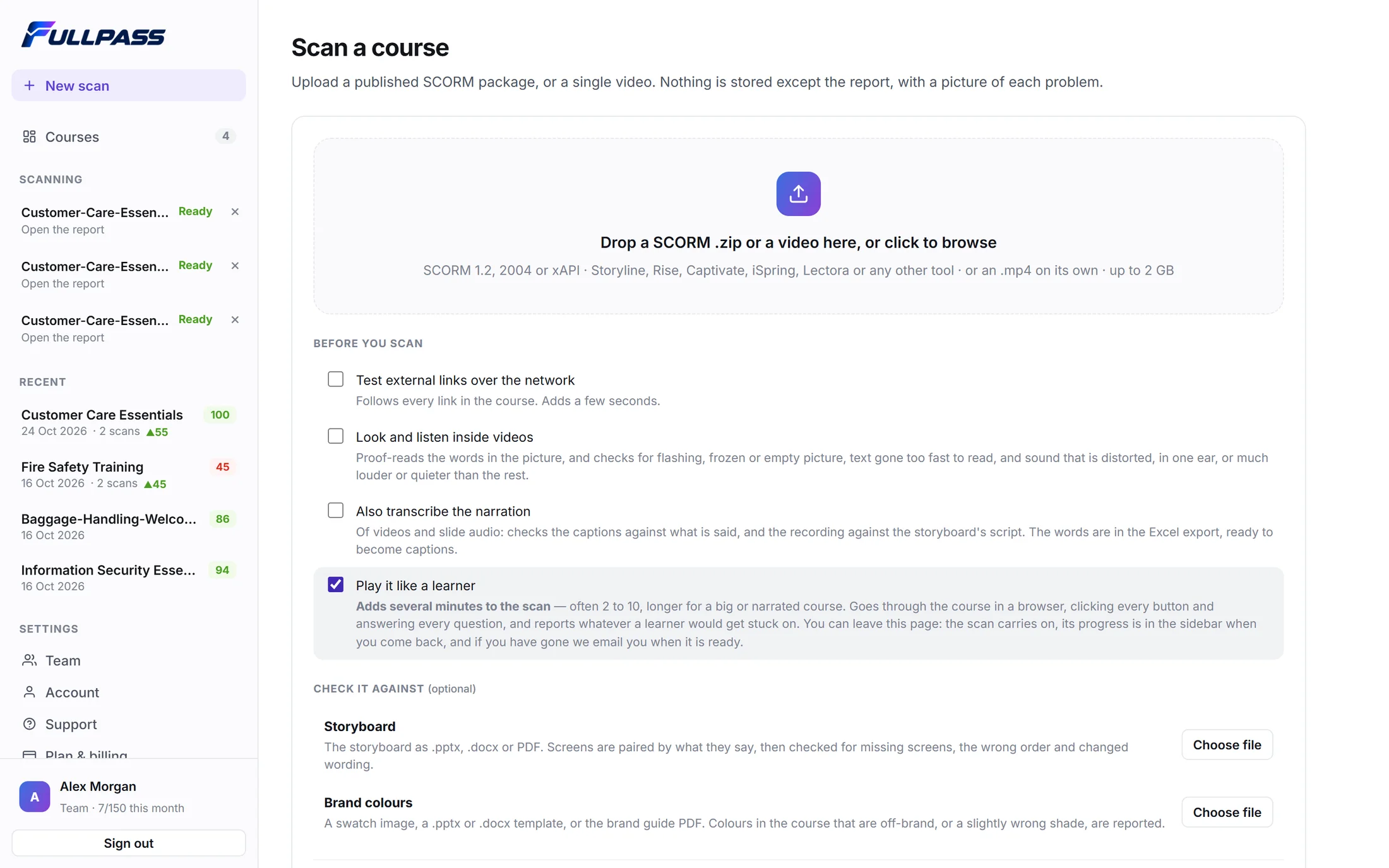
Upload a published SCORM or xAPI package, or a video. Add the storyboard and brand colours if you have them, and switch on the playthrough to have it played like a learner.
More than 120 checks run on every screen, word, picture, link and trigger. You get a readiness score, a sign-off verdict, and every problem pictured where it is.
Rule out anything intentional with a reason, assign the rest, export to PDF or Excel, share a read-only link, and scan again to see exactly what got fixed.
One course or a whole catalogue, one language or five, a client's list of changes and the LMS it all ends up in.
Spanish, French, German and Arabic are proofread as carefully as English, each in its own dictionary. Arabic set left to right, with its full stops at the start of the line, is caught too.
Upload a translated course with the course it came from. Text left in the original language, text that went missing, and numbers, links or emails that changed are listed screen by screen.
Add the client's feedback list, in Word, Excel or PDF, comments in the margin included. Each item is checked against the new version: done, not done, or one to look at.
Taking on a client's catalogue, or moving LMS? Upload the library in one go. Every course is checked, then one dashboard shows them all, with the problems they share and a spreadsheet to export.
Every report sets out the success criteria a course can fail and what was found for each. Courses built in HTML are also tried with the keyboard and read as a screen reader would.
An API, signed webhooks when a report is ready, and a Moodle plugin that checks a SCORM activity from inside Moodle. For developers
Upload, score and verdict, findings explained, videos checked, false positives ruled out, then shared and exported. Filmed in the real app.
See a sample report (PDF)A proper look before you commit: see what it finds in your own courses.
For freelancers and one-person learning teams.
For two or three people building courses together.
Everything in Solo, plus:
For agencies and in-house teams shipping courses every week.
Everything in Studio, plus:
Need more than 150 courses a month, or more than 10 people? Talk to us ↗
Not sure whether FULLPASS fits your workflow? Start here, or ask the people who built it.
info@fullpass.aiSCORM 1.2 and SCORM 2004 packages, xAPI (Tin Can) packages, and video files on their own, up to 2 GB. Storyline and Rise 360 courses are checked most deeply, slide by slide. Captivate, iSpring, Lectora, Camtasia, dominKnow and hand-built HTML courses get the packaging, tracking, link, media, spelling, wording and accessibility checks. You can add the storyboard (.pptx, .docx or PDF) and your brand colours to check the course against.
A chat is good at spelling and wording, and FULLPASS checks those too. But a chat reads your files; it doesn’t play them. It never presses Next, answers the quiz or sees what your LMS is told, so a button that does nothing, or a course that never reports complete, gets past it. A chat that takes video looks at about one frame a second, so it can’t measure flashing. And ask it twice, and you get two different lists. FULLPASS plays the course in a real browser, checks video frame by frame, and only calls something a showstopper when the package, the playthrough or a picture of the screen proves it.
English, Spanish, French, German and Arabic, each with its own dictionary and its own rules for punctuation. A course in two languages has each part proofread in its own. Narration in videos is heard in all five. Courses in other languages still get every check that does not depend on the words.
Yes. Upload the translated course and add the original as its master course. FULLPASS pairs the text screen by screen and lists what was left untranslated, what went missing, and any number, link or email that differs from the original, as well as proofreading the translation in its own language.
Any LMS that takes SCORM or xAPI. You can also connect yours: an API to send courses and read reports, signed webhooks that tell your system when a report is ready, and a Moodle plugin that checks a SCORM activity from inside Moodle.
Yes. Upload up to 300 courses in one go, or one zip that holds them. Each is checked like any upload and counts as one course on your plan, and you get one dashboard of them all, with the problems they share and a spreadsheet to export.
No. A package is held in memory while the scan runs and discarded when it finishes. It is never written to our disks, never backed up and never sent to anyone else. Only the report is kept, with a picture of each problem.
No, and we will not pretend otherwise. It takes the mechanical checking off your plate: every screen, word, link and LMS call, and, when you switch it on, a full playthrough in a real browser. A clean report means the mechanical faults are gone, not that the course teaches well. That judgement stays yours.
Seconds for most courses. Reading inside videos takes a little longer, and playing a course like a learner adds a few minutes. You can close the page: the scan carries on and the report is there when you come back.
Any time, from the billing portal. Cancellation takes effect at the end of the period you have paid for, and you are not charged again. The refund policy has the detail.
Find issues sooner, make reviews consistent, and give every course a better shot at getting out the door clean.